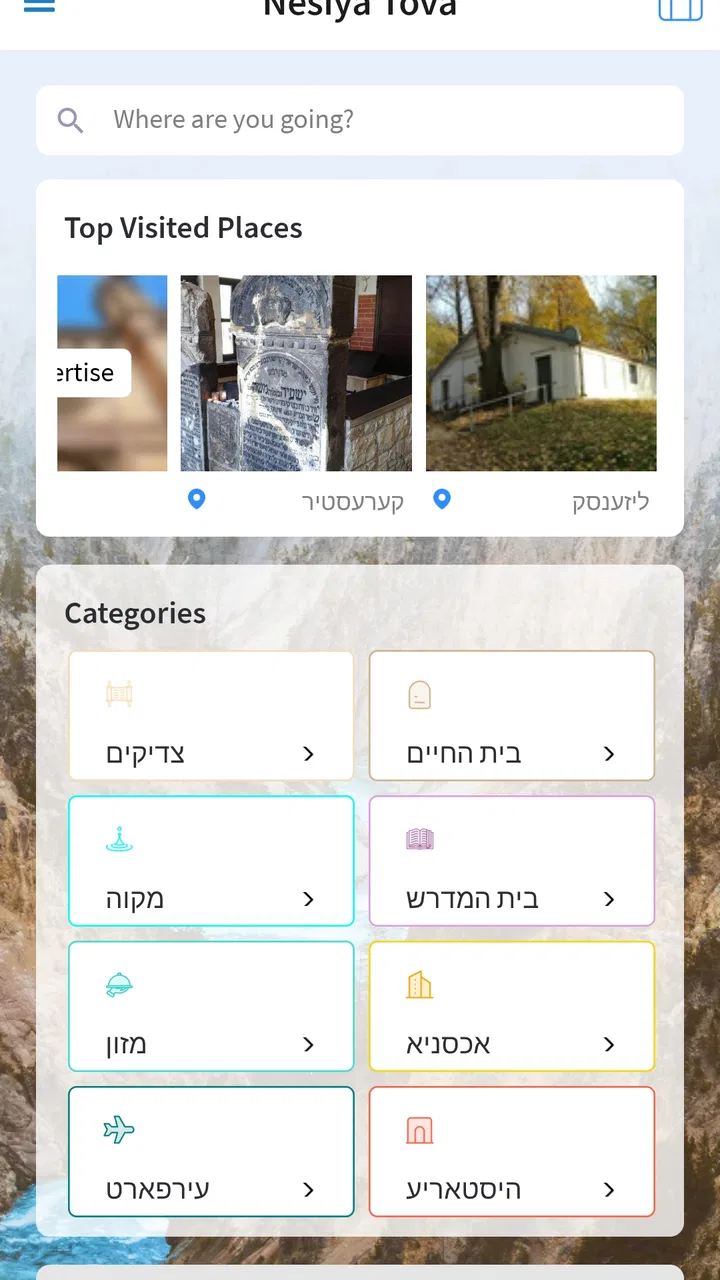
Nesiya Tova - נסיעה טובה
- 4.9
- Rating
- 10.00K
- Installs
- Free
- Price

 Analysis by App-foxy
I found Nesiya Tova – נסיעה טובה most useful when I treated it as a focused travel companion rather than a complete replacement for every travel tool on my phone. It belongs to the Travel & Local category and is built around helping people prepare for trips connected with מקומות הקדושים, or holy places. That focus gives it a clear purpose, especially for visitors who want travel-related help in one place instead of piecing everything together from unrelated apps.
My first impression was that the app makes the most sense for a particular kind of journey. If I were planning a visit to sacred destinations, I would want something that keeps the trip’s religious and practical context together. A general maps app can handle directions, while a translation app can handle language, but neither necessarily feels designed around this kind of travel. Nesiya Tova fills that narrower space. It is free to install, suitable for Everyone, and developed by Nesiya Tova LLC.
The app has been available since December 10, 2017, and its current version is 5.6.2. That history matters because it suggests this is not a brand-new experiment. At the same time, I would not judge it like a huge mainstream platform with a tool for every possible travel situation. Its value depends heavily on whether its destination-focused approach matches your plans.
You May Also Like

 Blood Strike: 2.5 Anniversary
Blood Strike’s Loadouts Turn Every Drop Into a Tactical Gamble
A close look at Blood Strike’s custom loadouts: how fast access to signature weapons reshapes its battle royale rhythm, rewards preparation, and narrows the gap between fights.

 Pandora - Music & Podcasts
Pandora’s Music Is Easy to Start, but Harder to Recover
Pandora’s strength is its low-effort path from a seed to a station. Its weak spot is how much confidence it asks you to place in connection, setup, and quiet recovery.

 8 Ball Pool
8 Ball Pool Is Built on Rivalries, Rematches, and Routine
A close look at the rivalries, rematches, shared routines, and unanswered safety questions that turn a quick pool match into a persistent mobile community.

 Samsung Music
Samsung Music’s Quiet Strength Is Playing What You Already Own
Its reach comes less from spectacle than from dependable access to a personal library. That simplicity is both the app’s strongest retention engine and its ceiling.

 AccuWeather: Weather Radar
AccuWeather Review: A Quick, Clear Forecast for Everyday Decisions
For everyday plans, the best forecast is the one you can understand quickly. AccuWeather makes rain timing, radar, and local conditions easy to act on, with a few trade-offs.

 Hill Climb Racing
Why Hill Climb Racing Still Turns Crashes Into One More Run
A tiny car, a bumpy hill and one more upgrade: Hill Climb Racing keeps resurfacing because its simple chaos makes every near-miss feel personal.
More From Our News Desk
View All News


Where the real friction begins
The first place I would expect users to get stuck is not necessarily inside a particular screen. It is deciding what role the app should play. The name and purpose point toward travel and needs related to holy places, but a traveler may open it expecting a full itinerary builder, a live navigation system, booking services, or a broad city guide. Those are different jobs. Before relying on it, I would define the exact task I want it to handle and keep a regular maps app available for ordinary navigation.
This distinction is important during a busy trip. Imagine arriving in an unfamiliar area with limited time before a visit. I might use Nesiya Tova to organize the relevant travel information and then use a familiar navigation tool to check the route, traffic, walking time, or public transport. Trying to force one specialized app to perform every part of that process can create unnecessary frustration. The strongest workflow is usually a combination: use this app for its specific travel context, and use general-purpose tools for tasks outside that context.
Another possible sticking point is language and presentation. The app’s identity includes Hebrew text, so people who do not read Hebrew comfortably should take a moment to see how easily they can understand the information they need. Even when an app is useful, unclear labels can slow down a trip. I would test the most important screens before leaving home rather than discovering a language barrier while standing outside a destination.
That small test also answers a practical question many travelers have: can I use it without learning the whole app at once? In my view, the best approach is to open it with one concrete goal. Look for the information connected with the place you intend to visit, follow that path, and note which parts are immediately understandable. A short trial is more valuable than casually browsing every section and assuming the app will make sense under pressure.
What I would check before leaving
My setup routine would begin with the basics. I would install the app while connected to a stable network, open it once, and move through the route I expect to use during the trip. I would also check that the phone is running a compatible system; the app supports Android 7.0 or later. That is a modest requirement, but older devices can still behave differently depending on storage, system updates, and background restrictions.
I would then make sure the phone has enough free space and that its battery is in good condition. These are not glamorous checks, but travel apps become difficult to judge when a phone is already overloaded or shutting down. If the app opens slowly, I would first restart the device and try again before assuming the application itself is broken. A clean start often separates a temporary phone problem from a repeatable app problem.
The next check is account and purchase awareness. The app is free, but in-app purchases range from $1.99 to $99.99 per item. I would not tap through a payment screen casually, particularly if another family member uses the same device. Before confirming anything, I would read what the purchase is intended to unlock and decide whether it is relevant to my trip. Free installation does not automatically mean every part of the experience is free.
I would also prepare a backup. That does not mean the app is unreliable; it means travel is an environment where network coverage, battery life, and device settings can all interfere with any digital service. I would save essential addresses or notes in a separate place and keep ordinary navigation available. The safest travel setup is one that does not depend on a single screen at the exact moment you need it.
For a group trip, I would repeat the important information out loud or share it through a separate method rather than assuming everyone will install the app. This is a useful trade-off: one person can use Nesiya Tova as the main reference while another keeps the route and meeting point accessible elsewhere. That reduces the chance that a language issue, low battery, or accidental sign-out affects the entire group.
A more reliable day-to-day workflow
Once the app is ready, I would use it in stages. Before the trip, I would explore the information connected with the destinations and note anything that affects timing or preparation. On the day itself, I would avoid repeatedly opening random sections. Instead, I would follow the same sequence each time: identify the destination, review the relevant travel information, confirm the route separately if necessary, and then move on.
This sounds simple, but it prevents a common travel mistake: confusing information gathering with navigation. Nesiya Tova can be part of the decision-making process without being the only tool for movement. A specialist app may provide context that a map does not, while a map may provide live route details that a specialist app is not designed to replace.
One practical use case is a visitor planning several sacred destinations in one day. I would review each stop in advance, create a rough order based on location and available time, and keep the app available for the destination-specific information. I would not assume that the order shown in my notes is automatically the most efficient route. Instead, I would verify the travel between stops with a general mapping service and leave extra time for delays.
A second use case is traveling with someone who has a different level of religious knowledge or language comfort. I could use the app as a shared reference point, then explain the relevant information in plain language. This is more useful than handing over a phone and expecting the other person to understand every label immediately. The app becomes a conversation aid rather than a private checklist used by only one traveler.
A third, less obvious use is using it before booking the rest of a trip. I would first identify which destinations matter most, then compare their locations and practical demands with my accommodation and transport plans. This can reveal whether a hotel or meeting point makes the journey unnecessarily complicated. In that situation, the app is valuable earlier than many people expect: not only when they are already traveling, but while shaping the trip around its purpose.
How I would recover when something goes wrong
If the app stops responding, I would use a calm sequence rather than repeatedly tapping the same button. First, I would close and reopen it. Then I would check the network connection, switch between available connections if appropriate, and restart the phone. If the problem continues, I would make sure the device has free storage and that the operating system meets the minimum requirement.
I would also distinguish between a screen that is slow and information that is missing. A slow screen may point to the phone, connection, or temporary system load. Missing information may be a matter of how the app organizes its content or what is available for a particular destination. Those situations need different responses. Restarting the phone can help the first, but it will not change what the app presents for a location.
If I had just completed an update, I would test the app again from the beginning of the task instead of relying on an old open screen. This is a useful recovery habit for any travel app: begin with the destination and repeat the short workflow you already tested at home. If the same problem appears more than once, I would record the exact step where it happens and use another source for that part of the journey.
For purchases, I would avoid repeating a payment attempt simply because the first screen did not immediately show a result. I would check the device’s purchase history or confirmation before trying again. This protects against accidental duplicate charges and is especially important because the available purchase range is broad. If the purchase is not essential to the immediate trip, waiting until the connection is stable is the sensible choice.
My recovery rule would be straightforward: if the app is needed for background information, switch to your backup and continue; if it contains something essential that cannot be replaced, resolve the issue before leaving the hotel or starting the journey. Travel pressure is the worst time to troubleshoot an unfamiliar interface.
When the app is not the cause
It is easy to blame a travel app when the real problem is the surrounding situation. A wrong route may come from a map service, a road closure, a changed transport schedule, or a misunderstanding of the destination name. A page that will not load may be caused by weak connectivity. A phone that becomes unresponsive may be overheating, low on storage, or running too many background tasks.
I would therefore compare the problem with a second source before deciding that Nesiya Tova is at fault. If both tools show the same destination but different travel times, I would treat the difference as a planning issue rather than an immediate software failure. If the app opens normally but I cannot find what I expected, I would reconsider whether I was looking for a general travel function that belongs in another app.
This is also where expectations matter. The app’s strongest identity is its connection with holy-place travel. Someone looking for restaurant discovery, hotel price comparison, detailed public transport tracking, or a broad offline world map may be better served by a dedicated alternative. A general maps app is usually the better choice for turn-by-turn movement. A booking app is better for reservations. A translation tool is better for quick language assistance. Nesiya Tova is worth adding when its specialized context is the part missing from those tools.
Privacy and comfort should influence the decision as well. I would read any permission request shown on my device and grant only what makes sense for the task. I would not install it on the morning of an important journey without first understanding how it fits my routine. The app is rated for Everyone, which makes it approachable for a wide audience, but suitability for a family still depends on whether parents are comfortable with the purchase flow and the way the app is used.
My practical verdict for travelers
Nesiya Tova – נסיעה טובה is a specialized free travel app from Nesiya Tova LLC that earns its place when a trip is centered on מקומות הקדושים. I like the fact that it has a defined purpose instead of pretending to be every travel service at once. Its average rating is 4.9 from around 218 ratings, and it has more than 10K installs, which gives it a meaningful user base while still suggesting a focused audience rather than a universal travel platform.
I would recommend it to travelers who want destination-related guidance connected with holy places, families preparing a religious trip, and visitors who prefer to organize the meaningful parts of a journey before they arrive. I would also recommend testing it early, especially if the phone is older, the traveler is not comfortable with Hebrew, or the trip depends on paid content. A few minutes of preparation can prevent much more stress later.
I would skip it as a primary tool if my main need were live navigation, hotel booking, transport comparison, or broad sightseeing discovery. In those cases, a mainstream map or travel service will probably be more efficient. The app works best beside those tools, not necessarily instead of them. That is not a weakness so much as an important boundary around what makes it useful.
The in-app purchase range also deserves a deliberate decision. I would start with the free experience, identify whether it covers my planned use, and only then consider an upgrade or additional item. I would never buy something merely because I am already traveling and feel rushed. The right purchase should solve a clear need, not compensate for a lack of preparation.
After using it as part of a broader travel routine, my opinion is positive but measured. The app is most convincing when I use it for its specific subject, verify movement details elsewhere, and keep a simple backup for essential information. If that matches your trip, it can make preparation feel more organized and more connected to the reason you are traveling. If your trip is ordinary sightseeing with no need for this specialized focus, your usual travel apps may be the simpler choice.
FAQs for Nesiya Tova - נסיעה טובה
01What is Nesiya Tova - נסיעה טובה?
Nesiya Tova - נסיעה טובה is a travel-focused app designed to help users organize and manage journeys more conveniently. Its Hebrew name means “Have a good trip,” and the app may be especially useful for people looking for travel information, planning assistance, or trip-related services in an Israeli or Hebrew-speaking context. Available tools and content can vary by version and location.
02Who can benefit from using Nesiya Tova?
The app may be useful for travelers, commuters, families, and anyone who wants travel-related information in one place. Hebrew-speaking users may find the interface and content particularly accessible, while visitors to Israel could also benefit if the app provides relevant local guidance. Before downloading, check the current store description to confirm that its services match your destination and travel needs.
03Is Nesiya Tova free to download and use?
Nesiya Tova may be available as a free download, but some features, services, bookings, or content could require payment or additional charges. App-store listings normally explain whether the application includes advertisements, subscriptions, or in-app purchases. It is worth reviewing those details before using any paid feature, especially when the app is connected to transportation, reservations, or other travel services.
04Does Nesiya Tova require an internet connection or access to location data?
Travel applications commonly need an active internet connection to display updated information, retrieve routes, load maps, or communicate with online services. Nesiya Tova may also request location permission if it offers nearby recommendations, navigation, or location-based assistance. You can review and change permissions in your device settings, although restricting access may prevent certain features from working correctly.
05Is Nesiya Tova available for both Android and iPhone?
Availability can depend on the developer, region, and the current store version. Before installing, search for the official Nesiya Tova - נסיעה טובה listing in Google Play or Apple’s App Store and verify the developer name, supported operating system, update date, and user reviews. Avoid downloading unofficial copies, since travel apps may handle personal details, location data, or payment-related information.
Pros
- Simple interface makes trip planning quick for Hebrew-speaking users.
- Useful for checking public transport routes across Israel.
- Supports practical travel planning for daily commutes and appointments.
- Can help compare available transportation options before leaving.
- Localized content is more relevant than many international navigation apps.
Cons
- Hebrew-focused design may be difficult for users who do not read Hebrew.
- Route accuracy depends on current transit schedules and operator updates.
- Coverage and usefulness may vary outside major Israeli cities.
- Some features may require location access and mobile data.
- The app may feel limited compared with full navigation platforms.

Nesiya Tova - נסיעה טובה
Gallery